How to get started with Pancakeswap!
Updated: Apr 3, 2022
For most of you, Crypto is a new market and it can get confusing! That's why I went through the trouble of breaking it down to make it as easy as possible:)

Download Crypto.com app , https://crypto.com/app/pzxbmzehqw , you will get free $25USD too:)
Download Google Authenticator to set up your 2FA for your apps/platform
Download Trust wallet
Sign up https://straitsx.xfers.com/ (Transfer money in from your bank for low transaction fees), set up 2FA,
To top up money into straitsx; home -> transfer in -> bank transfer -> add your bank account
Connect Fiat wallet (straitsx) to Crypto.com app and purchase BNB coins with it.
Select BNB and transfer -> withdraw -> external wallet
Open Trust wallet, select Smart Chain -> receive, copy code
Setup external wallet in Crypto.com app -> add wallet address -> select BSC, add Trust Wallet, paste the code from Trust Wallet, add your name
Go to https://pancakeswap.finance/ , connect wallet -> Wallet Connect -> choose Trust -> (ensure it is Smart Chain) connect
Go to Exchange (select trade -> exchange)
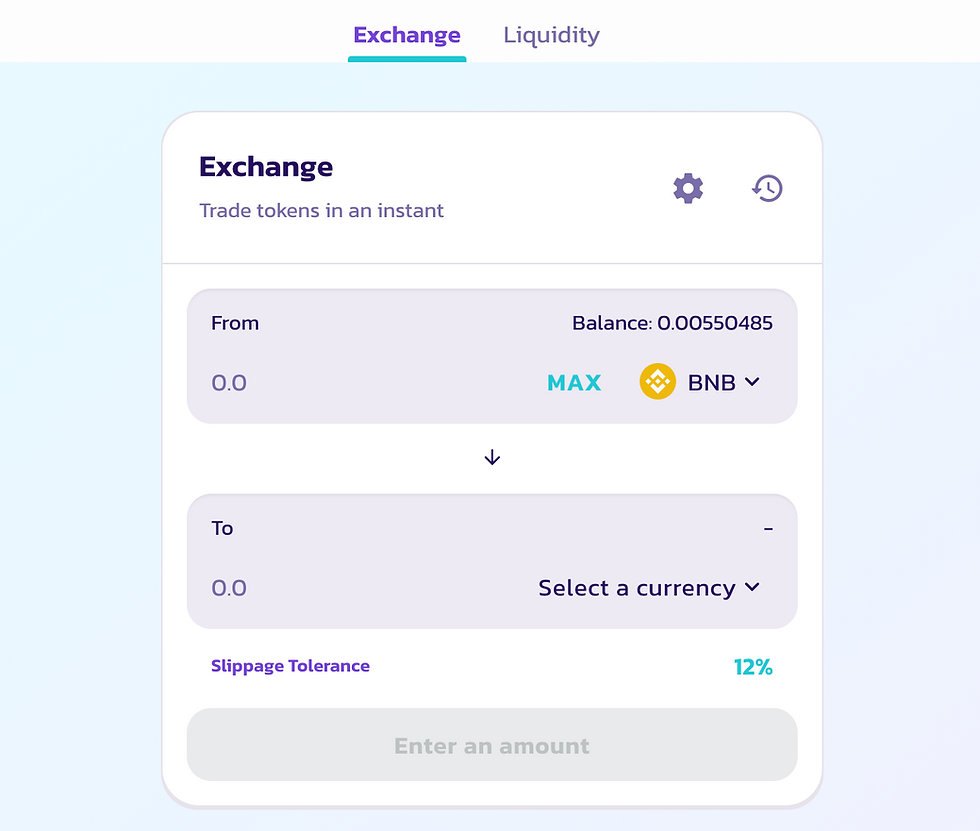
** buy the following at your own discretion
To buy SAFEMOON:

Go to https://coinmarketcap.com/ , search SAFEMOON -> copy address/ 0x16631e53c20fd2670027c6d53efe2642929b285c
Go back to Pancakeswap
In the TO selection -> select currency -> paste address, import
Choose how much you want to buy, it will pop up in Trust Wallet, proceed
• Click on the settings icon
• Set your slippage tolerance to 12%
proceed
To buy SWIPE(SXP):

Go to https://coinmarketcap.com/ , search SWIPE(SXP) -> copy address/ 0x8ce9137d39326ad0cd6491fb5cc0cba0e089b6a9
Go back to Pancakeswap
In the TO selection -> select currency -> paste address, import
Choose how much you want to buy, it will pop up in Trust Wallet, proceed
• Click on the settings icon
• Set your slippage tolerance to 10%
proceed

Comments